

FitMech Platform
Machine monitoring that works from the first shift
FitMech turns machine vibration and signals into data you can rely on: running state, downtime with reasons, cycles and OEE. No IT project, no machine replacement, on a subscription.
How it works
Like a stethoscope for your machine park
The sensor listens to the machine and algorithms in the cloud recognise what is happening. You see the results at the line, on your phone and in the browser.
Sensor on the machine
Measures vibration and acceleration during operation. We attach it with double-sided tape in fifteen minutes, without drilling and without stopping the machine.
Data transfer
Data travels over Wi-Fi or our LTE router to your dedicated FitMech cluster. No servers in the plant.
Analysis
The system recognises the machine state, detects cycles and stops, and calculates performance indicators.
Visualisation
Results go to Andon boards, the operator panel, the mobile app and online reports.
Modules
From the shop floor to the boardroom
Downtime under control
Every stop is logged automatically. Operators assign reasons on a tablet and you see which losses cost the most.
- Define a list of potential and planned downtimes
- Operators will be able to flag downtimes straight away with the Operatorss Panel app
- Find out which downtimes occur most often or last the longest

Performance, availability and OEE
Live view and full history with no time limit. Compare machines, shifts and periods, year on year too, without copying data into spreadsheets.
- Monitor and analyze the work of machines: on-the-fly, shift by shift, day by day, from last 6-12 months
- Get access to reports on effectivity, work cycles, downtimes, workload, availability, performance and breaks
- You can easily export data from the reports to common formats and process them further

Andon boards for the shop floor
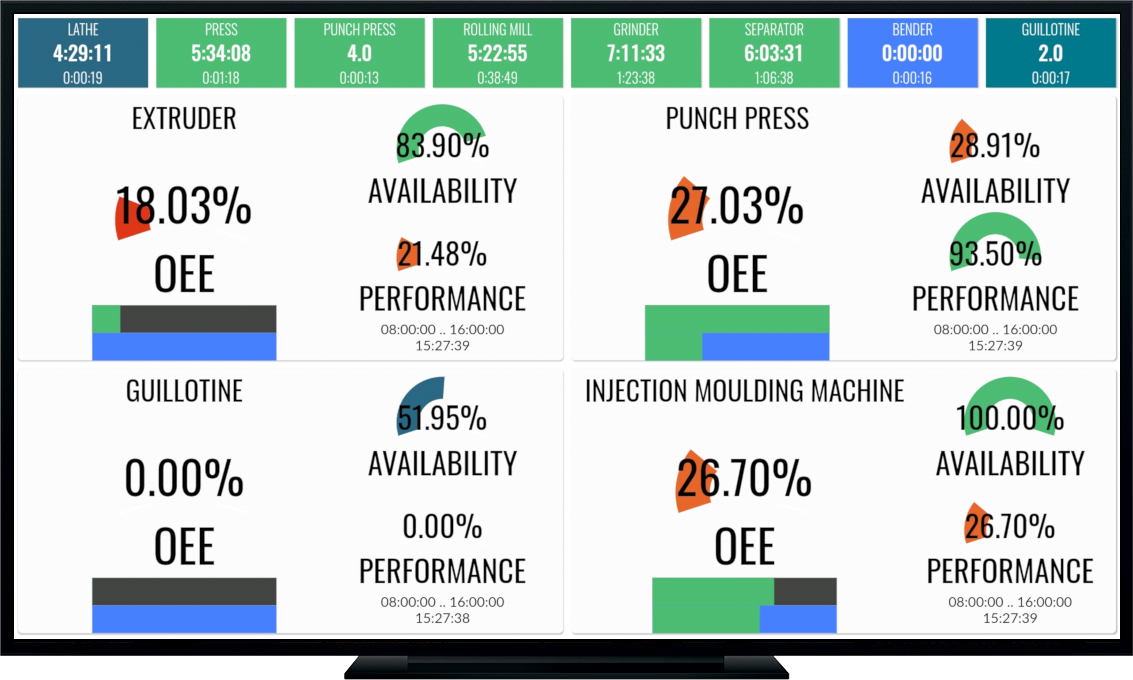
The cheapest and simplest scoreboard: the FitMech Display app on any Android TV device.
- Install the FitMech Display application on any Android TV device and turn it into an Andon dashboard
- In the Online Panel, define the indicators and the machines that will be displayed on the display
- The team reacts to problems during the shift, not after it
Operator panel
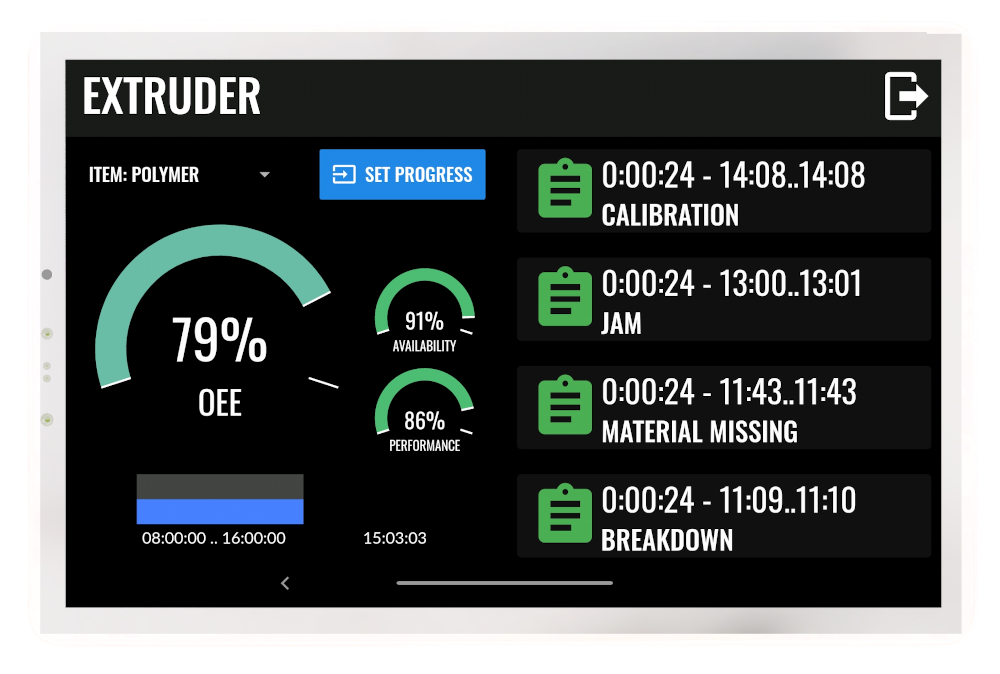
A tablet at the workstation instead of paper forms. Operators see the plan and indicators, and the office gets the information immediately.
- When the system detects a downtime, the machine operator can assign the appropriate cause to it with just few clicks, and add an optional comment (also by voice).
- Thanks to the Operator Panel, you can display the production plan directly at the workplace, you save time on printing and distributing paper documentation.
Apps
Data where it is needed
The same picture of production in the office, on the shop floor and on your phone.
Web dashboard
Reports, indicators and full history for management and the office.
Mobile app
An Android phone app: current machine status and downtime, also away from the shop floor.
Andon boards
FitMech Display on Android TV shows production status on the shop floor, no login needed.
Operator tablet
The operator picks the downtime reason from a list in seconds and marks changeovers.
Connecting machines
Three ways to get data from a machine
We choose the method to suit the machine, not the other way round. All data sources can be combined in one deployment.
FitMech sensor
Independent of machine brand and age. Ideal for getting started and wherever there is no access to the controller.
- Fitted in fifteen minutes with double-sided tape, no drilling
- No changes to the controls; warranty and CE marking unaffected
- Removable without a trace, can move to another machine
DIN rail sensor
For machines where vibration is not a good signal. It reads presence, temperature, pressure or flow sensors, bypassing the machine's control system.
- Power and Ethernet, optionally a photocell
- Analogue and digital inputs
- No configuration, data goes straight to the platform
Controller connection
If the machine has a PLC, we read data directly from it: counters, alarms, recipes and process parameters.
- OPC UA, Siemens S7, Modbus TCP/RTU, MQTT
- More signals: alarms, good parts and scrap
- Delivered by us or an integration partner
Limits
What FitMech does not do
We would rather say it at the start than at the second meeting.
It does not replace MES for orders, scheduling and batch tracking. It complements MES on machines MES does not reach.
The vibration sensor does not measure process parameters such as temperature, pressure or settings. The DIN rail sensor or a controller connection covers that.
It does not predict failures. It shows what is happening and what happened; conclusions about machine condition come from trends.
The quality part of OEE needs a source of reject data: a scale, a counter or operator input on the tablet. We agree this at the start.
Data and security
Your data, under your control
The platform is designed not to burden your IT department and not to lock data into a black box.
- Dedicated cluster: every customer has their own, separated instance of the system.
- Open API: full data access through a REST API and exports to common formats.
- Roles and permissions: operator panels give no access to management data.
- No infrastructure in the plant: you neither buy nor maintain servers, and the sensors only need internet access, with no access to the production network or controllers.
- FitMech servers, not a public cloud: we store data on our own servers in an ISO 27001 certified data centre in the EU. No time limit, deleted at your request.
- On-premise option: the whole system can run on your own infrastructure, so data never leaves the plant.
Next step
See FitMech on your own data
Open a demo account to explore the dashboard with sample data, or talk to us about a pilot on your machines.